Python Functions: A Complete Beginner’s Guide

Python Functions: A Complete Beginner’s Guide for New Programmers

Have you ever found yourself writing the same Python code over and over again? If yes, then it’s time to learn one of the most useful concepts in programming: Python functions.

Python functions help you organize your code, avoid repetition, and make your programs easier to read and maintain. In this beginner-friendly guide, you’ll learn what functions are, why they matter, and how to create and use them with simple examples.

What Are Python Functions?

A Python function is a reusable block of code that performs a specific task. Instead of writing the same instructions multiple times, you can place them inside a function and call that function whenever you need it.

Think of a function like a coffee machine. You press a button, and the machine performs a series of steps to make your coffee. You don’t need to know every internal step each time—you simply use the function.

Functions make your programs:

  • Easier to understand
  • Faster to write
  • Simpler to maintain
  • More organized
  • Reusable across different projects
# Python Functions: A Complete Beginner's Guide

**Meta Title:** Python Functions: A Complete Beginner's Guide for New Programmers

Have you ever found yourself writing the same Python code over and over again? If yes, then it's time to learn one of the most useful concepts in programming: **Python functions**.

Python functions help you organize your code, avoid repetition, and make your programs easier to read and maintain. In this beginner-friendly guide, you'll learn what functions are, why they matter, and how to create and use them with simple examples.

## What Are Python Functions?

A **Python function** is a reusable block of code that performs a specific task. Instead of writing the same instructions multiple times, you can place them inside a function and call that function whenever you need it.

Think of a function like a coffee machine. You press a button, and the machine performs a series of steps to make your coffee. You don't need to know every internal step each time—you simply use the function.

Functions make your programs:

* Easier to understand
* Faster to write
* Simpler to maintain
* More organized
* Reusable across different projects

## Why Should Beginners Learn Python Functions?

Many beginners start by writing everything in one long script. That works for small programs, but as your code grows, it quickly becomes confusing.

Using Python functions solves this problem by breaking a program into smaller, manageable pieces.

Some key benefits include:

* Reduces duplicate code
* Makes debugging easier
* Improves readability
* Encourages clean programming habits
* Makes teamwork easier on larger projects

Learning functions early will save you hours of frustration later.

## How to Create a Function in Python

Creating a function is simple. Python uses the `def` keyword.

```python
def greet():
    print("Hello, welcome to Python!")
```

Nothing happens yet because we've only defined the function.

To run it, call the function like this:

```python
greet()
```

Output:

```text
Hello, welcome to Python!
```

That's your first Python function.

## Understanding Function Parameters

Functions become much more useful when they accept information.

This information is called a **parameter**.

Example:

```python
def greet(name):
    print("Hello,", name)
```

Now call the function:

```python
greet("Ali")
greet("Sara")
```

Output:

```text
Hello, Ali
Hello, Sara
```

Instead of creating separate functions for every person, one function works for everyone.

## Returning Values from Python Functions

Sometimes a function should give something back instead of printing it.

For that, Python uses the `return` statement.

Example:

```python
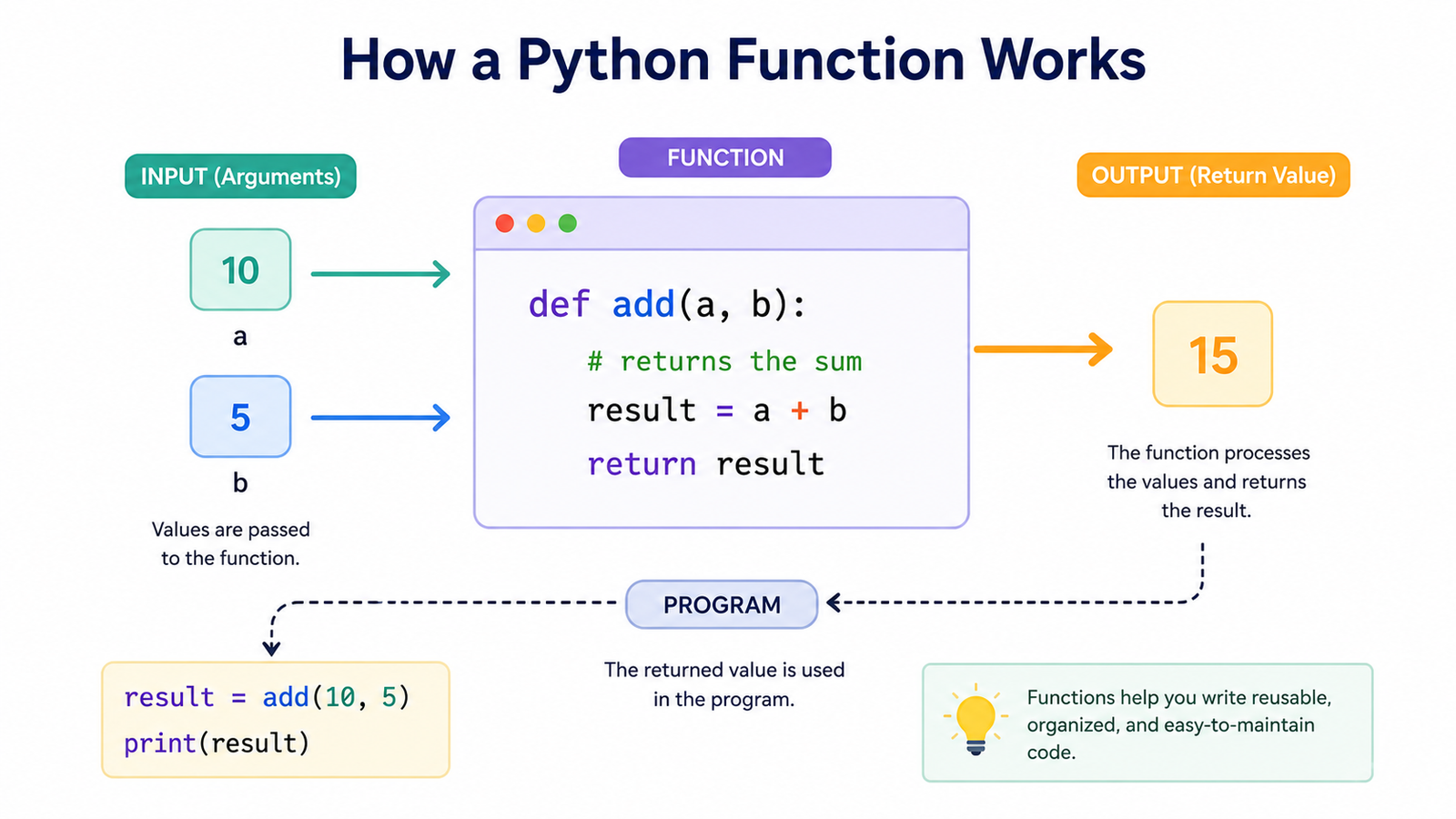
def add(a, b):
    return a + b
```

Now use it:

```python
result = add(10, 5)
print(result)
```

Output:

```text
15
```

The `return` keyword allows you to store the result and use it later in your program.

## Python Function Example: Calculating Student Grades

Let's build a simple real-world example.

```python
def calculate_total(math, science, english):
    return math + science + english

marks = calculate_total(80, 75, 90)

print("Total Marks:", marks)
```

Output:

```text
Total Marks: 245
```

Imagine using this function for hundreds of students. Instead of writing the calculation repeatedly, one function handles everything.

That's the true power of Python functions.

## Built-in vs User-Defined Functions

Python already includes many built-in functions that you use every day.

Examples include:

```python
print()
len()
input()
sum()
max()
min()
type()
```

You can also create your own, known as **user-defined functions**.

Example:

```python
def square(number):
    return number * number
```

Now you have your own reusable tool.

## Keyword Arguments and Default Parameters

Python functions also allow flexibility.

### Default Parameter

```python
def greet(name="Friend"):
    print("Hello", name)
```

Calling:

```python
greet()
```

Output:

```text
Hello Friend
```

Or:

```python
greet("Ahmed")
```

Output:

```text
Hello Ahmed
```

### Keyword Arguments

Instead of remembering the order, you can write:

```python
def student(name, age):
    print(name, age)

student(age=18, name="Ali")
```

Python automatically matches the values.

## Best Practices for Writing Python Functions

As you continue learning Python, following good habits will make your code much cleaner.

Here are a few practical tips:

* Keep each function focused on one task.
* Use meaningful function names.
* Avoid writing very long functions.
* Add comments when necessary.
* Return values instead of printing whenever possible.
* Test your functions with different inputs.

These habits make your programs easier to improve later.

## Common Mistakes Beginners Make

Everyone makes mistakes while learning Python. Here are a few common ones.

### Forgetting to Call the Function

Writing:

```python
def hello():
    print("Hi")
```

doesn't display anything until you call:

```python
hello()
```

### Missing Indentation

Python relies on indentation.

Incorrect:

```python
def hello():
print("Hi")
```

Correct:

```python
def hello():
    print("Hi")
```

### Forgetting the Return Statement

If you expect a value back, don't forget `return`.

Without it, the function returns `None`.

## When Should You Use Functions?

A simple rule is this:

If you're copying and pasting the same code more than once, create a function.

Functions are commonly used for:

* Calculating totals
* Validating user input
* Processing files
* Creating menus
* Working with databases
* Building web applications
* Automating repetitive tasks

Once you start using functions regularly, your code becomes much more professional.

## Final Thoughts

Learning **Python functions** is one of the biggest steps toward becoming a confident programmer. Functions help you write cleaner code, reduce repetition, and solve problems more efficiently.

Don't worry if the idea feels new at first. Start by creating small functions, experiment with parameters and return values, and gradually use them in larger programs. The more you practice, the more natural they will become.

The best way to master Python functions is by writing your own examples. Try creating functions for simple calculations, greetings, or games, and challenge yourself to reuse them in different programs. Every small project will strengthen your understanding and improve your coding skills.

Why Should Beginners Learn Python Functions?

Many beginners start by writing everything in one long script. That works for small programs, but as your code grows, it quickly becomes confusing.

Using Python functions solves this problem by breaking a program into smaller, manageable pieces.

Some key benefits include:

  • Reduces duplicate code
  • Makes debugging easier
  • Improves readability
  • Encourages clean programming habits
  • Makes teamwork easier on larger projects

Learning functions early will save you hours of frustration later.

How to Create a Function in Python

Creating a function is simple. Python uses the def keyword.

def greet():
    print("Hello, welcome to Python!")

Nothing happens yet because we’ve only defined the function.

To run it, call the function like this:

greet()

Output:

Hello, welcome to Python!

That’s your first Python function.

Understanding Function Parameters

Functions become much more useful when they accept information.

This information is called a parameter.

Example:

def greet(name):
    print("Hello,", name)

Now call the function:

greet("Ali")
greet("Sara")

Output:

Hello, Ali
Hello, Sara

Instead of creating separate functions for every person, one function works for everyone.

Returning Values from Python Functions

Sometimes a function should give something back instead of printing it.

For that, Python uses the return statement.

Example:

def add(a, b):
    return a + b

Now use it:

result = add(10, 5)
print(result)

Output:

15

The return keyword allows you to store the result and use it later in your program.

Python Function Example: Calculating Student Grades

Let’s build a simple real-world example.

def calculate_total(math, science, english):
    return math + science + english

marks = calculate_total(80, 75, 90)

print("Total Marks:", marks)

Output:

Total Marks: 245

Imagine using this function for hundreds of students. Instead of writing the calculation repeatedly, one function handles everything.

That’s the true power of Python functions.

Built-in vs User-Defined Functions

Python already includes many built-in functions that you use every day.

Examples include:

print()
len()
input()
sum()
max()
min()
type()

You can also create your own, known as user-defined functions.

Example:

def square(number):
    return number * number

Now you have your own reusable tool.

Keyword Arguments and Default Parameters

Python functions also allow flexibility.

Default Parameter

def greet(name="Friend"):
    print("Hello", name)

Calling:

greet()

Output:

Hello Friend

Or:

greet("Ahmed")

Output:

Hello Ahmed

Keyword Arguments

Instead of remembering the order, you can write:

def student(name, age):
    print(name, age)

student(age=18, name="Ali")

Python automatically matches the values.

Best Practices for Writing Python Functions

As you continue learning Python, following good habits will make your code much cleaner.

Here are a few practical tips:

  • Keep each function focused on one task.
  • Use meaningful function names.
  • Avoid writing very long functions.
  • Add comments when necessary.
  • Return values instead of printing whenever possible.
  • Test your functions with different inputs.

These habits make your programs easier to improve later.

Common Mistakes Beginners Make

Everyone makes mistakes while learning Python. Here are a few common ones.

Forgetting to Call the Function

Writing:

def hello():
    print("Hi")

doesn’t display anything until you call:

hello()

Missing Indentation

Python relies on indentation.

Incorrect:

def hello():
print("Hi")

Correct:

def hello():
    print("Hi")

Forgetting the Return Statement

If you expect a value back, don’t forget return.

Without it, the function returns None.

When Should You Use Functions?

A simple rule is this:

If you’re copying and pasting the same code more than once, create a function.

Functions are commonly used for:

  • Calculating totals
  • Validating user input
  • Processing files
  • Creating menus
  • Working with databases
  • Building web applications
  • Automating repetitive tasks

Once you start using functions regularly, your code becomes much more professional.

Final Thoughts

Learning Python functions is one of the biggest steps toward becoming a confident programmer. Functions help you write cleaner code, reduce repetition, and solve problems more efficiently.

Don’t worry if the idea feels new at first. Start by creating small functions, experiment with parameters and return values, and gradually use them in larger programs. The more you practice, the more natural they will become.

The best way to master Python functions is by writing your own examples. Try creating functions for simple calculations, greetings, or games, and challenge yourself to reuse them in different programs. Every small project will strengthen your understanding and improve your coding skills.
Leave a Comment

Your email address will not be published. Required fields are marked *

Scroll to Top