
If you’ve just started learning Python, you’ve probably come across lists vs tuples in Python – what’s the difference and wondered why both exist. They look almost the same at first, but the way they behave can completely change how your program works.
In this guide, we’ll break it down in a simple, practical way so you can confidently decide when to use a list and when to use a tuple in real projects.
What Are Lists in Python?
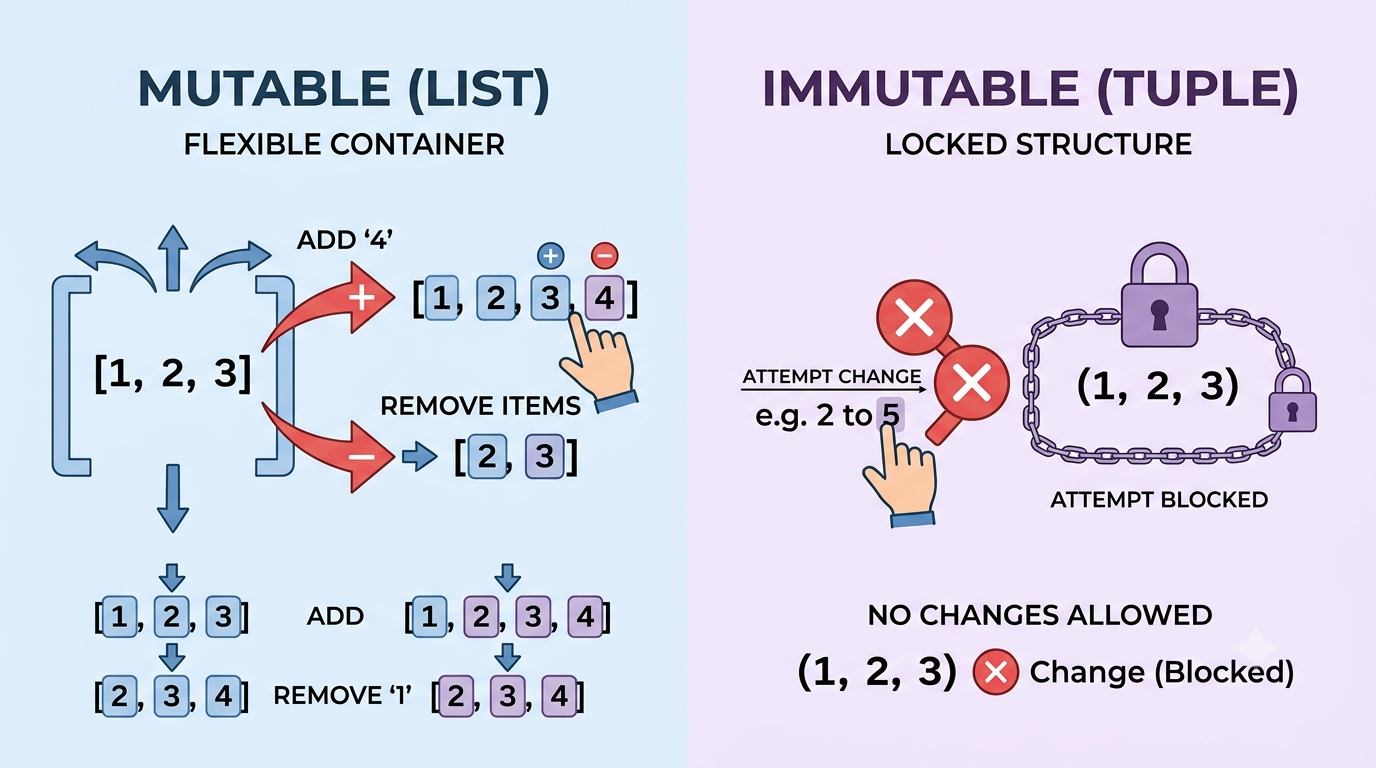
A list in Python is an ordered collection of items that you can change after creating it. Think of it like a notebook where you can keep adding, removing, or editing pages anytime.
Lists are created using square brackets:
fruits = ["apple", "banana", "mango"]
Key Features of Lists:
- Ordered (items keep their position)
- Changeable (mutable)
- Allows duplicates
- Can store different data types
Example:
data = [10, "Python", 3.5, True]
Lists are perfect when your data needs to be updated frequently.
What Are Tuples in Python?
A tuple is also an ordered collection, but it cannot be changed after creation. Once you define it, it becomes fixed.
Tuples are created using parentheses:
colors = ("red", "green", "blue")
Key Features of Tuples:
- Ordered
- Unchangeable (immutable)
- Allows duplicates
- Can store mixed data types
Example:
info = ("Ali", 25, "Developer")
Tuples are ideal for data that should stay constant throughout your program.
Lists vs Tuples in Python – Core Difference Explained
The main difference between lists and tuples in Python is mutability.
Let’s break it down simply:
| Feature | List | Tuple |
|---|---|---|
| Syntax | [] | () |
| Mutable | Yes | No |
| Speed | Slower | Faster |
| Memory usage | More | Less |
| Use case | Dynamic data | Fixed data |
So if you need flexibility → use lists
If you need stability → use tuples
Mutability: The Biggest Difference
Lists Are Mutable
You can modify them anytime:
numbers = [1, 2, 3]
numbers.append(4)
print(numbers)
Output:
[1, 2, 3, 4]
You can also:
- Remove items
- Update values
- Insert new elements
Tuples Are Immutable
Once created, they cannot be changed:
numbers = (1, 2, 3)
numbers[0] = 10  # This will cause an error
Output:
TypeError: 'tuple' object does not support item assignment
This is intentional—it protects your data from accidental changes.
When to Use Lists in Python
Use lists when your data is expected to change.
Real-world examples:
- Shopping cart items
- User input data
- To-do lists
- Game scores
Example:
tasks = ["study", "code", "exercise"]
tasks.append("sleep")
Lists are flexible, making them perfect for dynamic applications.
When to Use Tuples in Python
Use tuples when your data should stay constant.
Real-world examples:
- Coordinates (x, y)
- Database records
- Configuration settings
- Days of the week
Example:
coordinates = (24.8607, 67.0011)
Since coordinates should not change, tuples are a safe choice.
Performance Difference: Lists vs Tuples in Python
Another important difference is speed.
Tuples are faster because they are immutable. Python can optimize them internally.
Example idea:
- Tuple → faster iteration
- List → slightly slower due to extra memory operations
So if performance matters and data is fixed, tuples are better.
Memory Usage Comparison
Tuples use less memory than lists.
Why?
Because lists need extra space for possible modifications, while tuples are fixed.
This makes tuples more efficient for large datasets that don’t change.
Common Mistakes Beginners Make
1. Using lists when data should be fixed
If your data never changes, using a list adds unnecessary overhead.
2. Trying to modify tuples
Many beginners forget tuples are immutable:
t = (1, 2, 3)
t.append(4)  # Error
3. Confusing syntax
Remember:
- Lists → []
- Tuples → ()
Can Lists and Tuples Work Together?
Yes, absolutely. Python allows you to combine both.
Example:
data = [("Ali", 20), ("Sara", 22), ("John", 25)]
Here:
- Outer structure → list (changeable)
- Inner structure → tuple (fixed records)
This is very common in real-world applications.
Practical Insight: Think Like a Developer
Here’s a simple way to decide:
Ask yourself:
- Will this data change later?
- Yes → use list
- No → use tuple
This mindset helps you write cleaner and more efficient Python code.
Final Thoughts
Understanding lists vs tuples in Python – what’s the difference is a key step in becoming comfortable with Python data structures. Both are useful, but they solve different problems.
Lists give you flexibility, while tuples give you stability and performance. Once you know when to use each one, your code becomes cleaner, faster, and easier to manage.
Try experimenting with both in small programs—create a to-do list with lists and store fixed values like coordinates with tuples. That hands-on practice will make the difference crystal clear.