You’ve learned the basics of HTML and maybe even added some style with CSS. Now you’re probably wondering what comes next. The answer is JavaScript. If HTML builds the structure of a webpage and CSS makes it look attractive, JavaScript brings it to life.
In this guide, JavaScript for Beginners: Where to Start, you’ll learn what JavaScript is, why it’s important, and how to begin writing your first scripts. Whether your goal is to become a web developer or simply understand how interactive websites work, this tutorial will help you take the first step.
What Is JavaScript?
JavaScript is one of the core technologies of the web. It is a programming language that allows websites to respond to user actions, update content dynamically, validate forms, create animations, and much more.
Without JavaScript, most websites would be static pages with little or no interaction.
Think about clicking a button, opening a navigation menu, or seeing live search suggestions. JavaScript is what makes those features possible.
Why Learn JavaScript?
JavaScript is one of the most popular programming languages because it opens the door to many career opportunities.
Learning JavaScript helps you:
- Build interactive websites
- Create web applications
- Develop browser games
- Build mobile apps using frameworks
- Learn modern front-end libraries like React
- Explore back-end development with Node.js
It’s a skill that grows with you as you become a more experienced developer.
What You’ll Need Before Starting
Before learning JavaScript, it’s helpful to understand the basics of HTML and CSS.
You’ll also need:
- A code editor such as Visual Studio Code
- A modern web browser like Chrome or Firefox
- A willingness to practice regularly
No expensive software or special equipment is required.
Adding JavaScript to an HTML Page
The easiest way to use JavaScript is with the <script> tag.
Here’s a simple example:
“`html id=”a7m2kd”
My First JavaScript
Hello World
When you open the page in your browser, a popup message appears.

This is your first JavaScript program.

## Understanding Variables

Variables store information that your program can use later.

Example:
javascript id=”v5r8nx”
let name = “Alex”;
let age = 20;
You can display these values using:javascript id=”u3c6zp”
console.log(name);
console.log(age);
The browser's developer console will show the output.

Variables are used in almost every JavaScript project.

## Working with Functions

Functions allow you to group reusable code together.

Example:
javascript id=”j9w4ts”
function greet() {
alert(“Hello, welcome!”);
}
greet();
Whenever you call `greet()`, the message appears.

Functions help keep your code organized and easier to maintain.

## Responding to User Actions

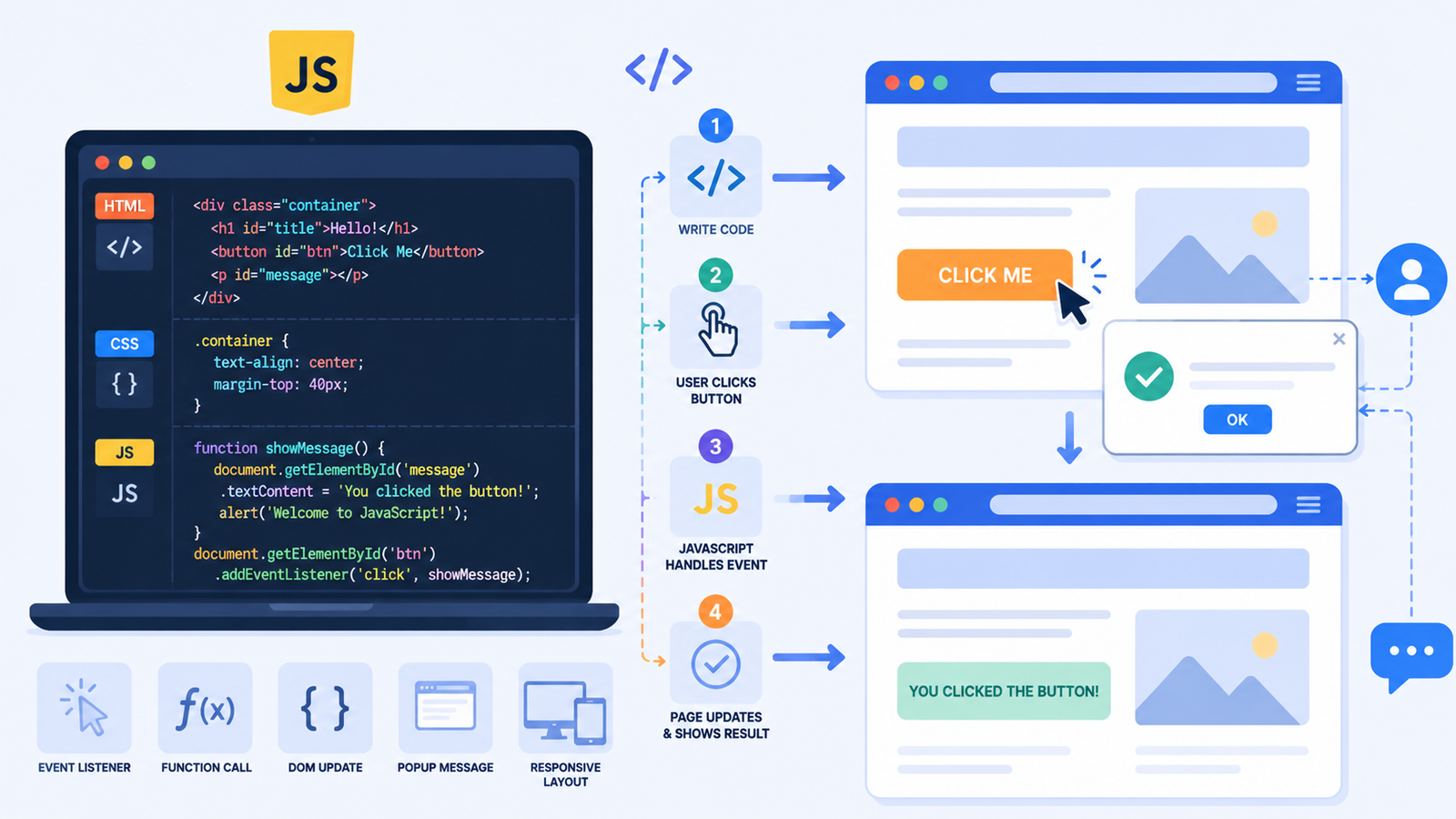
One of JavaScript's biggest strengths is responding to events.

Here's an example using a button.

HTML:
html id=”m2y7lb”
Click Me
JavaScript:javascript id=”h6q1ve”
function sayHello() {
alert(“You clicked the button!”);
}
Now your webpage reacts when someone clicks the button.

This simple interaction introduces event-driven programming.

## Using Conditional Statements

Programs often need to make decisions.

Example:
javascript id=”f4n9ka”
let score = 80;
if (score >= 50) {
console.log(“You passed!”);
}
else {
console.log(“Try again.”);
}
Conditional statements allow your program to respond differently depending on the situation.

## Repeating Tasks with Loops

Loops repeat code automatically.

Example:
javascript id=”g1d8qp”
for (let i = 1; i <= 5; i++) {
console.log(i);
}
Output:text id=”x2s5hr”
1
2
3
4
5
Loops are useful for processing lists, generating content, and handling repetitive tasks.

## A Simple Beginner Project

Let's combine what you've learned.

HTML:
html id=”b8v3nm”
Say Hello
JavaScript:javascript id=”k7r2cf”
function showMessage() {
alert(“Congratulations! You’re learning JavaScript.”);
}
This tiny project demonstrates how HTML and JavaScript work together.

It's simple, but it introduces one of the most important concepts in web development.

## Common Beginner Mistakes

Don't worry if your code doesn't work perfectly at first.

Here are some common mistakes to watch for.

### Missing Semicolons or Brackets

Although JavaScript can often handle missing semicolons, it's good practice to include them consistently.

Always check that opening and closing braces match.

### Misspelled Variable Names

JavaScript is case-sensitive.

These are different:
javascript id=”q4z8lt”
let name;
let Name;
A small typo can cause unexpected errors.

### Forgetting to Link JavaScript Files

If you're using an external JavaScript file, remember to include it correctly.
html id=”p9c6wy”
“`
Otherwise, your code won’t run.
Practical Tips for Learning JavaScript
Learning JavaScript takes practice, but you don’t need to rush.
Here are a few habits that make learning easier.
- Write code every day, even for 15 minutes.
- Build small projects after learning each concept.
- Experiment by changing values and testing different outcomes.
- Read browser error messages carefully.
- Practice using the browser’s developer tools.
One helpful exercise is recreating simple website features, such as a button that changes text or a form that displays a greeting. Small projects teach much more than memorizing syntax.
What Should You Learn Next?
After understanding the basics of JavaScript, continue learning these topics:
- Arrays
- Objects
- DOM Manipulation
- Events
- Functions in depth
- ES6 features
- Fetch API
- Async JavaScript
Each topic builds naturally on what you’ve already learned.
As your confidence grows, you’ll be able to create increasingly interactive web applications.
Final Thoughts
Learning JavaScript for Beginners: Where to Start is an exciting milestone in your web development journey. JavaScript transforms static webpages into interactive experiences and gives you the tools to build everything from simple websites to powerful web applications.
The best way to improve is by writing code regularly. Start with small scripts, experiment with buttons, variables, and functions, and gradually build more advanced projects. Every line of code you write strengthens your understanding. Open your editor today, create your first JavaScript program, and if you build something fun, share your progress in the comments and keep learning.