If you’ve just started learning Python, you’ve probably written programs that print text or perform simple math. But at some point, you’ll want to build something that feels like a real application. That’s exactly why this Build a Simple Calculator in Python beginner project is a great place to start.
A calculator project combines several Python basics into one program. You’ll use variables, user input, conditional statements, and arithmetic operators to create an interactive application. By the end of this guide, you’ll have a working calculator and a much better understanding of how Python programs are structured.
Why Build a Simple Calculator in Python?
One of the best ways to learn programming is by creating small projects. A calculator may sound simple, but it teaches skills you’ll use in larger applications later.
This beginner project helps you practice:
- Taking user input
- Working with numbers
- Using
if,elif, andelse - Performing mathematical operations
- Displaying results clearly
- Handling basic user errors
Instead of memorizing syntax, you’ll see how different Python concepts work together.
What You’ll Need
Before you begin, make sure you have:
- Python installed on your computer
- A code editor such as VS Code or IDLE
- Basic knowledge of variables and
print() - A willingness to experiment
That’s all you need to get started.
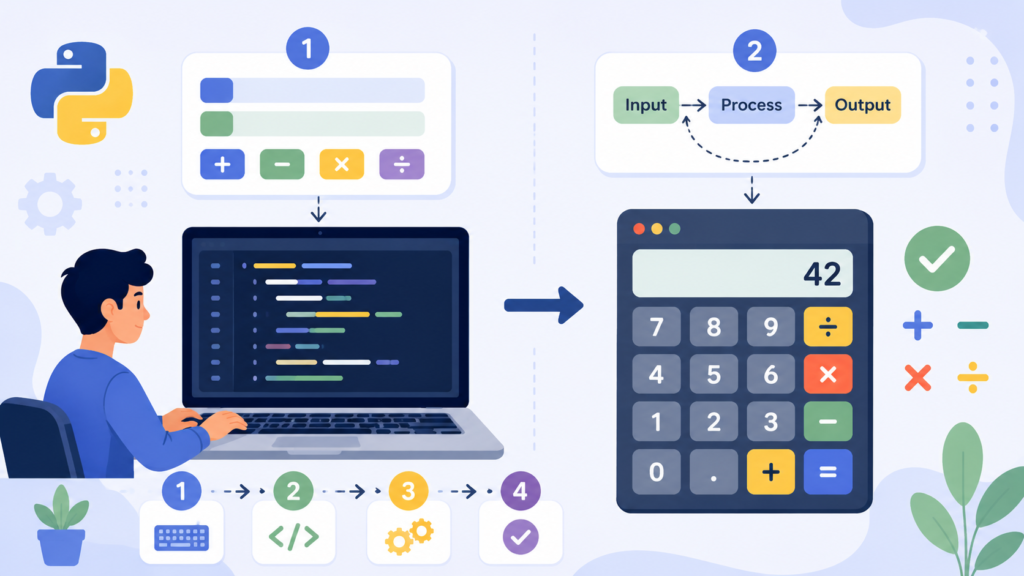
Understanding the Calculator Logic
Before writing code, let’s understand how the calculator should work.
The program will:
- Ask the user to enter the first number.
- Ask the user to choose an operator.
- Ask for the second number.
- Perform the selected calculation.
- Display the answer.
Breaking a project into small steps makes programming much easier.
Build a Simple Calculator in Python Step by Step
Let’s write the calculator one section at a time.
Step 1: Get User Input
First, ask the user for two numbers.
num1 = float(input("Enter first number: "))
num2 = float(input("Enter second number: "))
The float() function allows users to enter both whole numbers and decimal values.
Step 2: Choose an Operation
Now ask which mathematical operation the user wants.
operator = input("Choose (+, -, *, /): ")The user can now select addition, subtraction, multiplication, or division.
Step 3: Perform the Calculation
Use conditional statements to decide which operation should run.
if operator == "+":
    result = num1 + num2
elif operator == "-":
    result = num1 - num2
elif operator == "*":
    result = num1 * num2
elif operator == "/":
    if num2 != 0:
        result = num1 / num2
    else:
        result = "Cannot divide by zero."
else:
    result = "Invalid operator."
Notice that division checks whether the second number is zero. This prevents a common runtime error.
Step 4: Display the Result
Finally, print the answer.
print("Result:", result)At this point, your calculator is fully functional.
Complete Python Calculator Code
Here’s everything together.
num1 = float(input("Enter first number: "))
operator = input("Choose (+, -, *, /): ")
num2 = float(input("Enter second number: "))

if operator == "+":
    result = num1 + num2

elif operator == "-":
    result = num1 - num2

elif operator == "*":
    result = num1 * num2

elif operator == "/":
    if num2 != 0:
        result = num1 / num2
    else:
        result = "Cannot divide by zero."

else:
    result = "Invalid operator."

print("Result:", result)
Run the program and try different numbers and operators to see how it behaves.
Sample Output
Example 1
Enter first number: 15
Choose (+, -, *, /): *
Enter second number: 6

Result: 90
Example 2
Enter first number: 20
Choose (+, -, *, /): /

Enter second number: 5

Result: 4.0
Example 3
Enter first number: 10
Choose (+, -, *, /): /

Enter second number: 0

Result: Cannot divide by zero.
Testing different inputs helps you understand how your program responds in real situations.
How This Beginner Python Project Helps You Learn
This small project introduces several important programming concepts.
Variables
Variables store the numbers and operator entered by the user.
User Input
The input() function allows users to interact with your program.
Conditional Statements
The calculator uses if, elif, and else to decide which operation to perform.
Arithmetic Operators
You’ll practice using:
+Addition-Subtraction*Multiplication/Division
These are the building blocks of many Python applications.
Ways to Improve Your Calculator
Once your basic calculator works, try adding new features.
Here are a few ideas:
- Add exponent (
**) calculations. - Include modulus (
%) operations. - Allow square root calculations.
- Let users perform multiple calculations without restarting.
- Round decimal answers automatically.
- Display a simple menu before asking for input.
Small improvements like these help you become more confident as a programmer.
Common Mistakes Beginners Make
Don’t worry if your calculator doesn’t work perfectly on the first try.
Here are some common issues.
Forgetting float()
Without float(), Python treats user input as text.
For example:
input("Enter number:")returns a string, not a number.
Using = Instead of ==
Remember:
if operator == "+":The double equals sign compares values.
Incorrect Indentation
Python depends on indentation to organize code.
Even one misplaced space can cause an error.
Ignoring Invalid Input
Always think about what happens if the user enters something unexpected.
Adding simple checks makes your program more reliable.
Tips for Learning Through Projects
Building projects is one of the fastest ways to improve your programming skills.
Here are a few habits that make learning easier:
- Write the code yourself instead of copying it.
- Test different inputs, including incorrect ones.
- Change numbers and operators to see what happens.
- Add one new feature each time you practice.
- Read error messages carefully—they usually tell you what’s wrong.
Every small project teaches lessons that books alone can’t provide.
Final Thoughts
This Build a Simple Calculator in Python beginner project is more than just a calculator. It brings together variables, user input, conditions, and mathematical operations into one practical application. Completing projects like this builds confidence and prepares you for more advanced Python programs.
Don’t stop after making the basic version. Add new operations, improve the interface, or challenge yourself to create a menu-driven calculator. Every improvement helps you become a stronger programmer. Give it a try today, and if you come up with your own version, share your ideas in the comments!